




When you buy Bitcoin on an exchange, you see a balance in your account but you do not actually hold that Bitcoin. The exchange controls the private keys and simply shows you an internal IOU entry. If that exchange is hacked, goes bankrupt, or faces asset freezes, customers are just unsecured creditors and may never be made whole.
- What a Crypto Wallet Really Is (Keychain Analogy)
- Hot Wallets vs Cold Wallets: The Great Divide
- Deep Dive: Cold Wallets (Hardware and Offline Solutions)
- Custodial vs Non‑Custodial: Who Actually Holds the Keys?
- Critical Security: Seed Phrases and Recovery
- Which Wallet Should You Choose? (Stage‑Based Recommendations)
- Conclusion: Be Your Own Bank—Carefully
This is the most famous mantra in cryptocurrency, and usually, people learn it the hard way.
Not Your Keys, Not Your Crypto
Syed Safwan Abbas, Hashtechwave
To be a true crypto owner, you must take self‑custody. That means moving your assets into a crypto wallet where only you control the keys and recovery phrase. In this guide, we will demystify wallets, explain hot vs cold storage, and help you choose the right “vault” for your digital gold.
What a Crypto Wallet Really Is (Keychain Analogy)
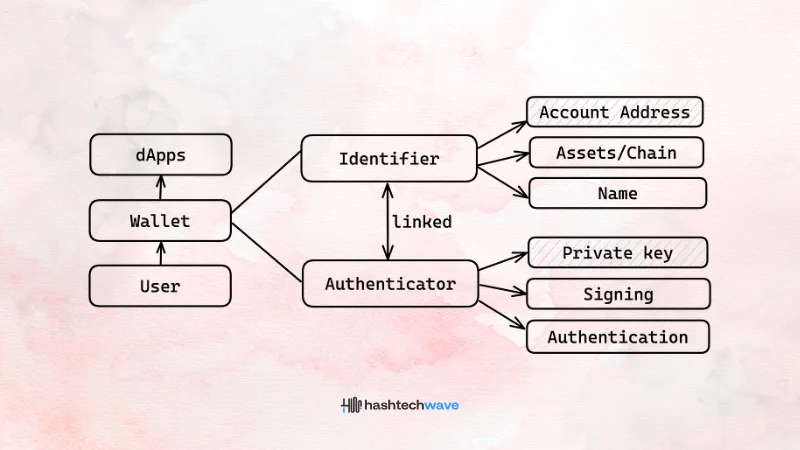
The term “wallet” is misleading, because your coins never sit inside an app or a device. They always live on the blockchain as entries on a distributed ledger. What the wallet actually stores is your private keys and the information needed to sign transactions.
A useful way to think about this is the keychain analogy:
If you lose your wallet app or hardware device but still have your seed phrase, you can restore your access on a new device and the coins are still there. If you lose the seed phrase and have no backup, the coins remain on the blockchain—but you can never touch them again.
This is why self‑custody is both empowering and unforgiving: you remove exchange risk but accept full responsibility for your keys and backups.
Hot Wallets vs Cold Wallets: The Great Divide
Wallets are usually grouped by their connection to the internet: hot (online) and cold (offline).
| Feature | Hot Wallets (Online Storage) | Cold Wallets (Offline Storage) |
|---|---|---|
| Format | Mobile apps, browser extensions, desktop software. | Hardware devices (USB‑like), or paper/metal backups. |
| Best for | Daily spending, active trading, connecting to DeFi and NFTs. | Long‑term HODLing and large balances. |
| Risk | Exposed to online threats like malware, phishing, and malicious dApps. | Extremely low online hack risk; main risk is physical loss, theft, or fire. |
| Analogy | Your checking account: convenient for regular use, not for life savings. | Your gold vault: slower to access, but far safer for wealth storage. |
Most serious users eventually use both: a hot wallet for small, active funds and a cold wallet for long‑term savings.
Deep Dive: Types of Hot Wallets
If you are just starting and your total holdings are under about 1,000 dollars, a reputable hot wallet is usually free and sufficient.
A. Mobile Wallets (Apps)
Mobile wallets are apps you install on your iPhone or Android. They typically give you a seed phrase and let you send, receive, and sometimes swap tokens directly from your phone.
- New users learning self‑custody with small amounts.
- Everyday payments (P2P transfers, small purchases).
- Quick access when you are away from a computer.
Popular examples:
- Trust Wallet: Beginner‑friendly and supports many chains (Bitcoin, Ethereum, Solana, and more).
- Exodus: Polished interface with desktop + mobile clients and in‑app swap options.
Security notes:
- Always set a strong device PIN and enable biometric lock in the app.
- Never store your seed phrase in photos, screenshots, or note apps on the same phone.
B. Web3 Wallets (Browser Extensions)
Browser wallets such as MetaMask plug into Chrome or Brave and let you interact directly with decentralized apps (dApps) like Uniswap, Aave, or NFT marketplaces.
- Use DeFi protocols, liquidity pools, or yield farms.
- Trade NFTs, join DAOs, or vote in on‑chain governance.
- Need to connect to many different dApps across Ethereum and Layer 2s.
Common options:
- MetaMask: Industry standard for Ethereum and most EVM chains and L2 networks.
- Phantom: Focused on Solana, with solid NFT and DeFi integration.
- Coinbase Wallet: Non‑custodial wallet (not the exchange account) with a clean UX.
- Bookmark the dApps you use; double‑check URLs before connecting.
- Regularly review and revoke dApp permissions you no longer need.
- Be extremely careful with “Sign” prompts you do not understand; malicious signatures can approve unlimited spending.
C. Desktop Wallets
Desktop wallets are software programs you run on your laptop or PC. They can be convenient for users who prefer managing funds on a workstation and sometimes offer more advanced features.
They are a good fit if you:
- Manage multiple wallets and chains from one machine.
- Run your own nodes or want custom RPC endpoints.
- Maintain a hardened, up‑to‑date system with anti‑malware protections.
But remember: a compromised computer can leak keys or seed phrases as easily as a compromised phone.
Deep Dive: Cold Wallets (Hardware and Offline Solutions)
Once your portfolio grows beyond roughly 1,000 dollars, it becomes rational to invest in hardware‑level protection. A hardware wallet stores your private keys in a secure chip and signs transactions internally, so your keys never leave the device—even when connected to a virus‑infected computer.
Top Hardware Wallets for 2026
| Wallet | Best for | Est. Price | Key Features |
|---|---|---|---|
| Ledger Flex | Overall users | ~249 dollars | New E‑Ink touchscreen, Bluetooth, broad multi‑chain support; designed as a premium daily driver device. |
| Trezor Safe 7 | Security‑focused | ~249 dollars | Open‑source firmware, simple interface, strong reputation in Bitcoin circles. |
| Tangem | Beginners | ~55 dollars | Card‑like form factor -> tap with your phone via NFC -> no cables and very portable. |
| Ledger Nano X | Budget users | ~149 dollars | Well‑known hardware wallet with Bluetooth and a compact design, though older screen tech. |
Key benefits of hardware wallets:
- Private keys stay inside a tamper‑resistant secure element.
- Transactions must be confirmed on the device screen, limiting phishing risks.
- They are ideal for long‑term storage and larger holdings.
Critical best practice:
- Only buy hardware wallets directly from the official manufacturer or verified partners. Third‑party resellers can tamper with devices or pre‑seed them, leading to theft later.
Custodial vs Non‑Custodial: Who Actually Holds the Keys?
Before choosing tools, you must understand custody, who controls the private keys.
1. Custodial Wallets (The “Bank” Model)
With a custodial wallet, such as a centralized exchange account, the company holds your keys and gives you a login and a balance.
Pros:
- Familiar sign‑in flows with “forgot password” recovery and customer support.
- Built‑in on‑ramps, trading interfaces, and sometimes staking or earn features.
Cons:
- The provider can freeze withdrawals or close accounts.
- Your funds are exposed to the company’s operational, regulatory, and security risks.
- You own a claim, not the actual coins on‑chain.
Custodial solutions are like a bank account: convenient, but you must trust the institution completely.
2. Non-Custodial Wallets (The “Safe” Model)
Non‑custodial wallets give you full control of the private keys and seed phrase. No central party can stop you from sending a transaction, censor it, or move your funds.
Pros:
- True ownership of your assets.
- No single company can freeze or rehypothecate your coins.
- Easy to move between services, DeFi protocols, and chains.
Cons:
- No password reset: if you lose your seed phrase and have no backup, funds are likely gone forever.
- You are responsible for backups, physical security, and avoiding scams.
This is self‑custody. You become your own bank—with all the power and all the responsibility that implies.
Critical Security: Seed Phrases and Recovery
When you set up a non‑custodial wallet (hot or cold), you are shown a list of 12 or 24 random words. Example:
Witch collapse practice feed shame open despair creek road again ice least
This is your seed phrase (also called a recovery phrase). It is literally your money encoded as words: anyone who has this phrase can recreate your wallet and control every coin it holds.
Why the Seed Phrase Matters
- It can restore your wallet if your phone or device is broken, lost, or stolen.
- It also gives a thief full control if they get it—even if they never touch your device.
Leading hardware wallet makers and exchanges all warn that your seed phrase is your wallet’s lifeline and must never be shared or stored online.
The 3 Commandments of Seed Security
- NEVER take a screenshot: Do not take screenshots, store it in your notes app, email it to yourself, upload it to the cloud, or keep it in a password manager. Malware and phishing kits increasingly scan for seed patterns in files and photos.
- Write it down and secure it offline: Write the words neatly on paper and store them in a safe, waterproof, and fire‑resistant location. For serious savings, use a metal or steel seed backup plate that can survive fire, water, and physical damage.
- Never share your seed phrase—ever: No legitimate support agent, exchange, wallet provider, or validator will ever ask for your 12 or 24 words. Any request for your seed phrase, even under the pretext of “verifying your wallet” or “unlocking rewards,” is a scam.
Advanced users sometimes add a passphrase (an extra word or sentence on top of the seed) or split funds across multiple wallets to reduce worst‑case risk further.
Which Wallet Should You Choose? (Stage‑Based Recommendations)
Here is a practical roadmap based on your current stage in the crypto journey. These are not financial recommendations, but security‑oriented setups that align with how real users grow.
1. The Newbie (0–500 dollars)
You are learning how crypto, exchanges, and wallets work.
- Keeping small amounts on a major exchange can be acceptable while you learn, as long as you enable strong 2FA (preferably app‑based or hardware key, not SMS).
- Use this time to experiment with withdrawing a tiny amount to a mobile wallet like Trust Wallet or Exodus, so you understand addresses, network fees, and confirmations.
2. The Investor (500–5,000 dollars)
Crypto is now a meaningful part of your assets.
- Move long‑term holdings to a reputable non‑custodial hot wallet like Trust Wallet or Exodus, where you control the keys but still have an easy interface.
- Keep only the amount you actively trade on exchanges; periodically move profits back to your self‑custody wallet.
- Use separate wallets for long‑term holdings, DeFi experiments, and high‑risk on‑chain plays to contain damage if one address is compromised.
3. The Pro (5,000+ dollars)
You now hold serious value that deserves hardware‑level security.
- Buy a hardware wallet such as Ledger Flex or Trezor Safe 7 and move your core holdings there.
- Keep your seed phrase on metal backups, stored in at least two secure, separate locations (e.g., home safe and a safety deposit box), and consider a passphrase for extra protection.
- Continue using a hot wallet for daily activity and DeFi, but regularly sweep savings into cold storage.
At every level: test your backup by restoring a small wallet from your seed phrase on a fresh device before you trust it with life‑changing money.
Conclusion: Be Your Own Bank—Carefully
Taking custody of your assets is the final step in becoming a true crypto native. It can feel intimidating at first—suddenly you are responsible for keys, seed phrases, and backup plans—but it is also deeply empowering.
By understanding the difference between hot and cold wallets, custodial and non‑custodial control, and how seed phrases work, you now have the foundation to:
- Decide where to keep day‑to‑day spending vs long‑term savings.
- Avoid common disasters like exchange collapses, phishing scams, and seed loss.
- Build a wallet setup that matches your risk tolerance and goals.
Self‑custody is not about never using exchanges—it is about making sure that, at the end of the day, the keys to your most important assets belong to you.
Editor’s Recommendation For Learners:
- Know What Crypto Is.
- Understand the Blockchain Technology.
- Choose your assets (BTC vs ETH).
- Make your purchase (Buying Guide).
- And now, you have secured it.
Next Step: Now that your setup is complete, you are ready to start analyzing the market. Read our guide on Crypto Trading for Beginners: Market Orders & Pairs.
Can I use the same wallet on my phone and computer?
What happens if I lose my Ledger/Trezor device?
Are paper wallets safe?
They are “cold” (offline), so they are hack-proof, but they are fragile. Ink fades, paper burns, and water destroys them. We recommend Metal/Steel backups for serious storage.
Why does my wallet address change?
Many modern Bitcoin wallets automatically generate a new receiving address for each incoming transaction to improve your privacy. All these addresses still belong to your wallet, and funds sent to any of them are visible under your total balance. You can reuse old addresses, but rotating them makes it harder to track your activity on‑chain.